Granola alternative for Mac: free, local options that keep your audio on your Mac
Short answer: if you like Granola’s bot-free Mac workflow but want your audio to stay on your Mac, or want something free with no history limit, the closest local options are Routine Meeting, Muesli, Meetily, Biscotti, MacWhisper, Hapi and Whisper Notes. If what you want is a free hosted tool or something for a whole team, Fathom and Fellow are the nearest cloud alternatives. Granola itself is a good product. The reasons people leave are where the audio goes, the free plan’s 30-day history, no saved audio, and, for some, recent privacy news. Which alternative fits depends on which of those matters to you.
Disclosure: I build Routine Meeting, one of the apps below. Facts about the other apps come from their own websites and help pages, checked on 2026-10-06 to 2026-10-08. If something has changed, tell me and I will fix it.
Why people look for a Granola alternative
In search results and Reddit threads, four reasons come up again and again:
- Privacy. Granola does not use a meeting bot, but its transcription and summaries run on outside providers (details below).
- The free plan. Granola’s free Basic plan keeps 30 days of meeting history, per its pricing page.
- No saved audio. Granola says it does not store meeting audio, so you cannot replay a recording or import a file.
- Reliability and openness. One Reddit user in an r/NoteTaking thread reported meetings not being captured correctly, and many want open source.
What Granola does well
Be fair to it first. Granola is a notepad: you type a few lines during the meeting and it blends them with the transcript into structured notes. Per its pricing and home pages (checked 2026-10-07):
- Apps for Mac, Windows, iPhone, Android and Apple Watch.
- Chat with your notes and shared folders.
- Business plan at $14 per user per month adds unlimited history, advanced models and integrations such as Notion, HubSpot and Zapier. Enterprise is $35 and adds SSO and HIPAA.
- A SOC 2 Type 2 audit, per its security page.
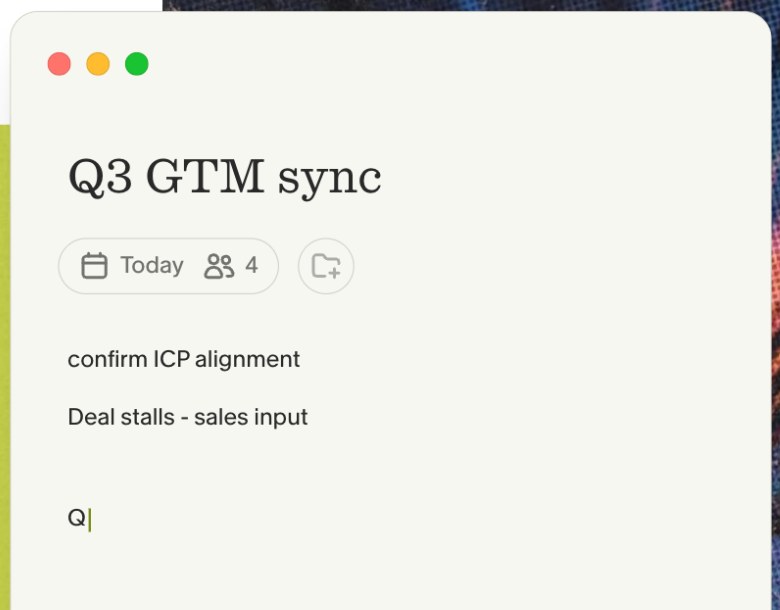
If you work in a team that shares notes, or you want integrations, a local app will not replace that.
Where Granola’s data goes
Per Granola’s security page, checked 2026-10-06:
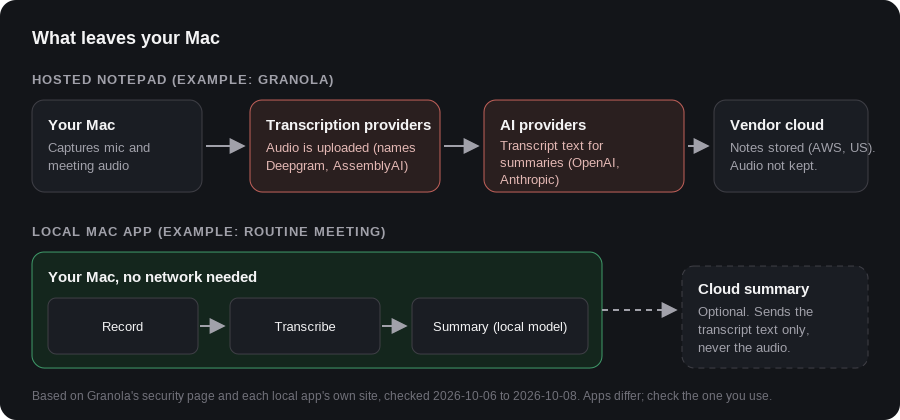
- It does not store meeting audio.
- Speech is transcribed in real time through third-party transcription providers (it names Deepgram and AssemblyAI), and summaries use AI providers (it names OpenAI and Anthropic).
- Notes are stored in its US-hosted AWS environment, encrypted at rest and in transit.
- It does not allow third parties to train on your data. Granola itself trains on anonymized data, with an opt-out for individuals.
In the news. In August 2026, Computerworld and Lifehacker reported that Granola faces a class action alleging that its software records conversations without all participants’ consent and uses captured data for model training. Forbes noted that Otter.ai faced similar allegations. These are allegations in a complaint. I have not read the complaint or Granola’s response, and nothing here says they are true. The practical lesson applies to every notetaker, local or not: tell the people you are recording, whatever app you use.
The alternatives, step by step
Routine Meeting (free)
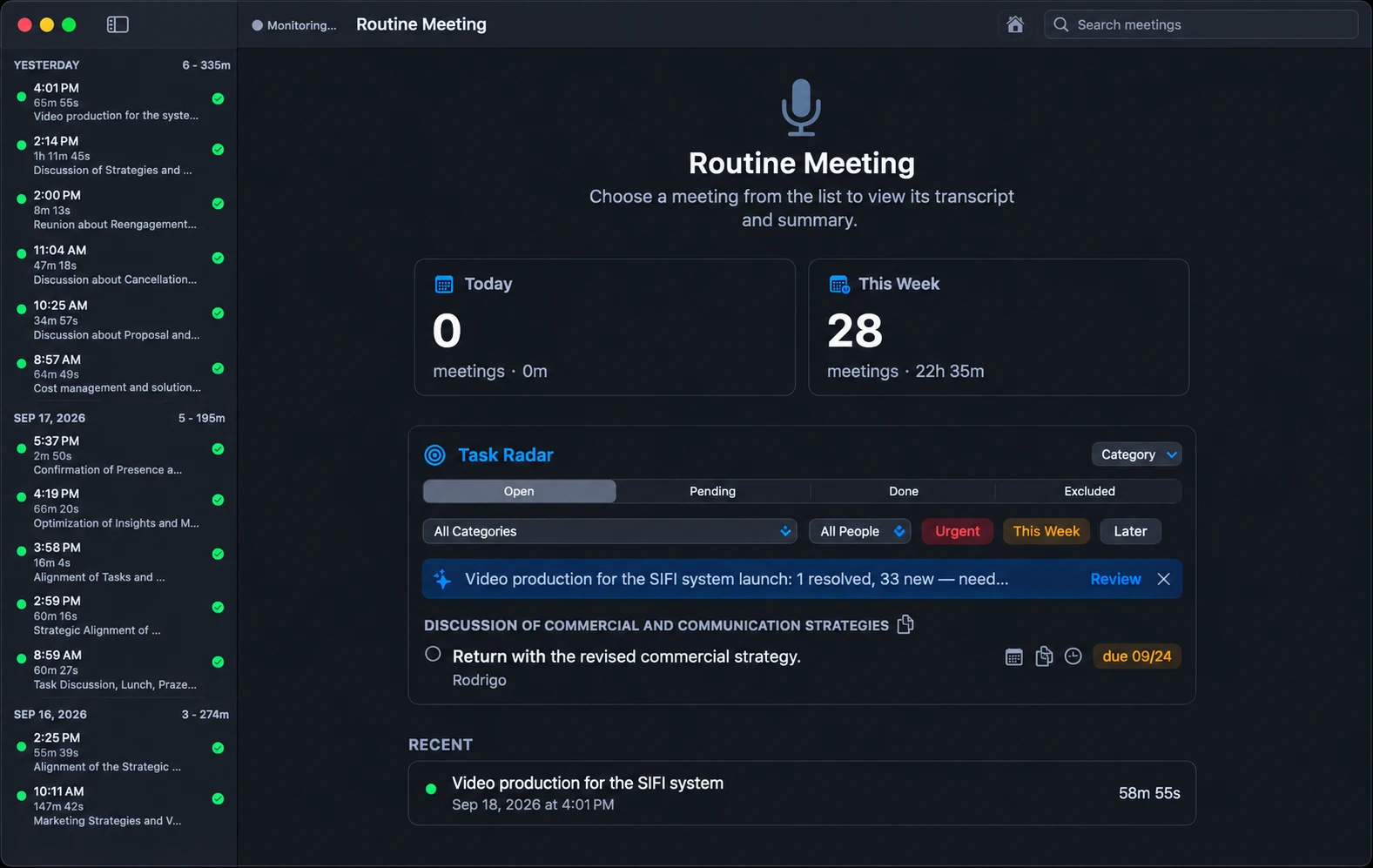
A menu-bar app that starts by itself when it hears the pattern of a real call: your microphone active plus audio coming from another app. It does not depend on a list of supported apps, so Zoom, Meet, Teams, Slack huddles, Discord and FaceTime are all picked up with no per-app setup.
- Capture: microphone plus system audio. Audio only, no video. macOS shows its purple recording indicator.
- Transcription: on your Mac with Parakeet v3 (Whisper, through WhisperKit, is an option). Your side and the other side are transcribed separately and labeled “What you said” and “What others said”.
- Summaries: optional. A fully local model, or your own Gemini key (only transcript text is sent, never audio).
- Search: keyword search across meeting titles, attendee names and emails, summaries and transcripts.
- Account and price: none, and free. No history limit.
- Requirements: Apple Silicon, macOS 14.2 or later.
Limits: closed source, speaker labels are you versus everyone else, no typed-notes blending like Granola’s, no team sharing, no integrations, no SOC 2 report, no mobile app.
Muesli (free, open source)
Per its site, Muesli is a free, open-source app for Apple Silicon Macs that captures meeting audio from your computer without a bot and transcribes on-device with Parakeet or Whisper models. It has a dedicated Granola alternative page. I could not confirm from the pages I read whether its summaries run locally or whether it labels speakers.
Meetily (free community edition, MIT)
Open source and cross-platform (macOS, Windows, Linux). It transcribes with Whisper or Parakeet and summarizes with Ollama locally, or with a cloud provider if you choose. Per its README, speaker identification is a Pro feature. Setup is more hands-on than a menu-bar app.
Biscotti (free, source-available)
A fully local pipeline: Whisper V3 Turbo, per-person speaker separation and a Gemma model for summaries, action items and titles. It needs macOS 15 or later and recommends 16 GB of RAM. The license is PolyForm Perimeter, so it is source-available, not open source in the usual sense.
MacWhisper (Pro: 64 EUR, one time)
A mature transcriber for files and dictation that also records meetings in Zoom, Teams, Webex and more, with automatic start and end detection, no bots and local models. Its docs describe meeting recording as a beta and say all participants are grouped as one speaker for now.
Hapi (from 79 EUR once for meetings)
Per its site, Hapi needs macOS 14 or later, says it is 100 percent local, auto-detects Zoom, Meet, Teams, Slack, WhatsApp and a few more apps from a list, and offers speaker labels and on-device summaries on its Local plan. The free tier covers voice notes only.
Whisper Notes ($14 once on Mac)
Per its site, it transcribes fully on the device with Whisper Large V3 Turbo and Parakeet V3, supports offline meeting recording on the direct-download Mac version, labels speakers on the device after the recording ends, and has no monthly minute cap. It needs Apple Silicon.
Fathom (free, hosted)
Not a local option. Per its pricing page, the free plan includes unlimited recordings, transcripts and AI summaries, and recording is bot-free in beta or bot-based. Its paid Premium plan is $16 a month billed annually. Choose it if free history is your main complaint and you accept a hosted service.
Fellow (hosted, for teams)
Per its pricing page, a free plan with 5 lifetime AI notes, then Team at $7 per user per month billed annually. Built around shared agendas, with an AI notetaker, hosted on AWS. A good fit if the whole team will adopt it.
Others that appear in search results
Basil AI, Humla, Anarlog, CraftNote, Wispr Notetaker and Circleback also appear for this query. I did not check them, so I do not compare them here.
Side by side
| Granola | Routine Meeting | Muesli | Meetily | Biscotti | MacWhisper | Hapi | |
|---|---|---|---|---|---|---|---|
| Bot in the call | No | No | No | No | No | No | No |
| Speech recognition | Third-party providers | On your Mac | On your Mac | On your Mac | On your Mac | On your Mac | On your Mac |
| Summary | Cloud (OpenAI, Anthropic) | Local model or your Gemini key | Not checked | Ollama or cloud | Local (Gemma) | Your keys or local | On-device (Local plan) |
| Speaker labels | Not checked | You vs others | Not checked | Pro only | Per person | One speaker (beta docs) | Yes (Local plan) |
| Starts automatically | Not checked | Yes, any app | Not checked | Not checked | Not checked | Yes, listed apps | Yes, listed apps |
| History limit | 30 days on free | None | None | None | None | None | None |
| Price | Free; $14 Business | Free | Free | Free; Pro paid | Free | Free tier; Pro 64 EUR once | Free voice notes; 79 EUR once |
| Source | Closed | Closed | Open source | MIT | Source-available | Closed | Not stated |
“Not checked” means I did not verify it and will not guess.
Which should you pick?
- You want audio to stay on your Mac, with a free app that starts by itself in any app: Routine Meeting.
- You want open source you can inspect: Muesli or Meetily.
- You want per-person speaker labels and a fully local summary: Biscotti, if your Mac is on macOS 15 with enough RAM.
- You prefer paying once: MacWhisper, Whisper Notes or Hapi.
- You want free but accept a hosted service: Fathom.
- You need team sharing, integrations or a compliance report: stay with Granola, or use Fellow.
Moving from Granola
- Export what you need. Copy or export important notes from Granola before the free plan’s 30-day window drops them.
- Install and grant permissions. Microphone, and Screen and System Audio Recording. Only audio is captured.
- Run both for a week. Keep Granola for team meetings while you test the local app on your own calls.
- Choose how summaries run. Local is private but weaker than a large cloud model.
- Tell participants. Local does not change consent rules.
Recording consent
Many places require telling the other people that you are recording, and some require everyone’s consent. This applies to Granola, to every alternative above, and to any note-taker you add to a call. Tell participants before you record.
FAQ
Is there a free alternative to Granola? Yes. Routine Meeting, Muesli, Meetily and Biscotti are free on a Mac, and Fathom has a free hosted plan.
Does Granola only work on Mac? No. Per its site, it is available for macOS, Windows, iOS and Android, plus an Apple Watch app.
Does Granola store my audio? Per its security page, no. It transcribes through third-party providers and keeps notes on its servers.
Is Granola being sued? A class action alleging consent and data-use violations was reported in August 2026. These are allegations, and I have not read the complaint or Granola’s response.
Is there an open-source Granola alternative? Muesli and Meetily are open source, and MacParakeet is GPL-3.0.
Sources (checked 2026-10-06 to 2026-10-08)
- Granola: granola.ai (home, pricing and security pages)
- Muesli: muesli.works and muesli.works/granola-alternative
- Meetily: github.com/Zackriya-Solutions/meetily
- Biscotti: github.com/scosman/Biscotti
- MacWhisper: macwhisper.com and docs.macwhisper.com
- Hapi: speakhapi.com
- Whisper Notes: whispernotes.app/whisper-notes-vs-otter-ai
- Fathom: fathom.ai/pricing
- Fellow: fellow.ai/pricing
- Lawsuit reports: Computerworld and Lifehacker (Aug 6, 2026), Forbes (Aug 21, 2026)