Otter alternative for Mac: local, no account, no minute caps (and how Otter's Mac app really works)
Short answer: Otter is a strong choice for teams that want shared notes, integrations and a compliance report. If you are one person on a Mac who wants meeting transcription that stays on your machine, with no account and no minute cap, a local app is the better fit. Routine Meeting, MacWhisper, Biscotti, MacParakeet and echo99 all record and transcribe on the Mac. The common claim that “Otter makes a bot join your call” is out of date: Otter has had a bot-free desktop app for Mac since late 2025. The differences that remain are where audio is processed and stored, whether you need an account, and what you pay. If your main problem is Otter’s free-plan limits or its price, the cost table below compares a year of each option, including one free cloud tool.
Disclosure: I build Routine Meeting, one of the options below. Facts about Otter and the other apps come from their own websites and help pages, checked on 2026-10-06 (the cost table and the added options on 2026-10-07). Otter’s Mac product page sits behind a sign-in wall, so for the Mac app I used its help center, its desktop pages and its launch post.
How Otter works on a Mac today
Otter offers two ways to capture a meeting, and many comparison pages only mention the first:
- The bot. Otter’s notetaker joins your Zoom, Teams or Google Meet call as a participant.
- The desktop app. Announced on October 7, 2025 for Mac and Windows. Per Otter’s help article, it records audio without a bot joining. It needs macOS 12.3 or later, plus two permissions: Microphone, and Screen and Audio Recording. It can detect meetings on Zoom, Teams, Google Meet and Slack huddles, or you press Record yourself, and it also covers in-person conversations. If it hears no conversation for 10 minutes it stops recording after 15 seconds unless you tell it to continue.
Otter’s pages do not say which plans include the desktop app, so confirm that on your own account. If your reason for looking at alternatives is “I don’t want a bot in my meetings”, Otter’s own desktop app already addresses that.
Where Otter’s data goes
Otter states these facts on its privacy and security page:
- Data is stored in AWS S3 with AES-256 encryption.
- It is SOC 2 Type 2 audited and states GDPR, CCPA and HIPAA compliance.
- It de-identifies user data before using it to train its own models. It says no customer data is used to train its AI service providers’ models.
- Deleted conversations stay in the trash for 30 days.
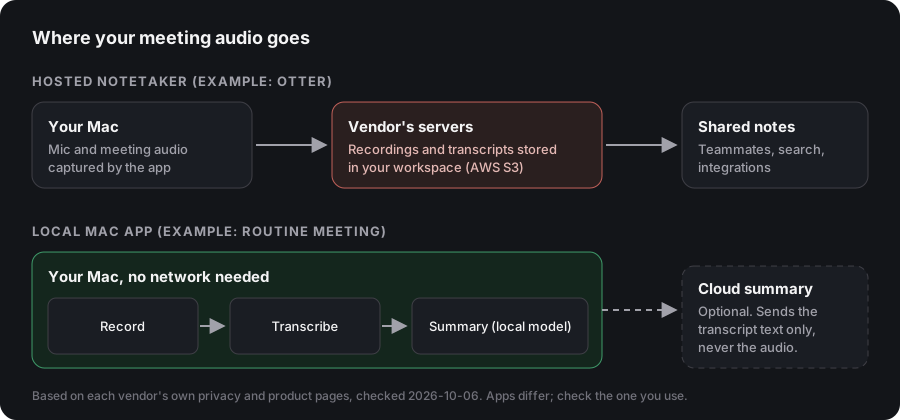
In the Otter pages I read, there is no mention of on-device transcription. Its model is hosted: your recordings and transcripts live in your Otter workspace. For many teams that is a feature, because notes are shared and searchable. For someone who wants the audio to stay on their laptop, it is the deciding difference.
What Otter costs, and where the limits are
From Otter’s pricing page, checked 2026-10-06:
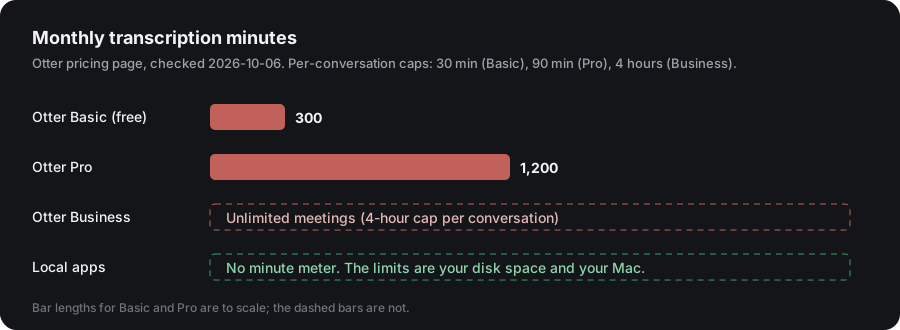
| Plan | Price (per user) | Monthly minutes | Max per conversation |
|---|---|---|---|
| Basic (free) | 0 | 300 | 30 minutes; 3 lifetime file imports |
| Pro | $16.99 monthly, or $8.33 per month billed annually | 1,200 | 90 minutes; 10 imports per month |
| Business | $30 monthly, or $19.99 per month billed annually | Unlimited meetings | 4 hours |
| Enterprise | Custom | Custom | Custom (adds SSO, SCIM; HIPAA as an add-on) |
If you hit minute caps (a common complaint in Reddit threads about Otter), the reason to switch is simple: local apps have no minute meter, because the only limits are your disk and your Mac.
What a year costs, side by side
Prices from each product’s own page, checked 2026-10-07. Otter’s Pro price is per user.
| Option | Cost for 12 months | Where it runs |
|---|---|---|
| Otter Basic | Free: 300 minutes a month, 30 minutes per conversation | Hosted |
| Otter Pro | About $100 billed annually ($8.33 a month), or about $204 paid monthly ($16.99) | Hosted |
| Fathom | Free plan with unlimited recordings, transcripts and summaries. Premium is $16 a month billed annually | Hosted. Bot-free capture is in beta, per its pricing page |
| Routine Meeting | Free | On your Mac |
| MacWhisper | 64 EUR once (Pro) | On your Mac |
| Whisper Notes | $14 once on Mac, per its site | On your Mac |
| Hapi | Free tier for voice notes only. Meeting features are the Local plan at 79 EUR once | On your Mac |
If the limit that bothers you is Otter’s 300 free minutes, the simplest free cloud alternative is Fathom, and the simplest free local one is an app with no meter. If you would rather pay once than monthly, MacWhisper, Whisper Notes and Hapi are one-time purchases.
Interviews, journalists and long recordings
Many people leave Otter because of file limits, not meetings. On Basic, Otter allows 3 lifetime file imports and 30 minutes per conversation. On Pro it allows 10 imports a month and 90 minutes per file. A two-hour interview or a long podcast does not fit either.
For recorded files, use a file transcriber on your Mac. MacWhisper and Whisper Notes both transcribe files locally. Whisper Notes states unlimited minutes with no monthly cap. Routine Meeting is built for live calls: it starts when it hears a conversation, so it is not the right tool for transcribing an audio file you already have. If you record a call with it, there is no per-file limit.
The alternatives, step by step
Routine Meeting (free)
A menu-bar app that starts by itself when it hears the pattern of a real call: your microphone active plus audio coming from another app. That means it also catches Slack huddles, Discord, FaceTime and calls relayed to your Mac, with no per-app setup.
- Capture: microphone plus system audio through macOS ScreenCaptureKit. Audio only, no video. macOS shows its purple recording indicator.
- Transcription: WhisperKit on your Mac’s Neural Engine, with your side and the other side transcribed separately and labeled “What you said” and “What others said”.
- Summaries: optional. Use a fully local model (no key, no network call), or your own Gemini key, which sends the transcript text, never the audio.
- Account and price: none and free.
- Requirements: Apple Silicon, macOS 13 or later.
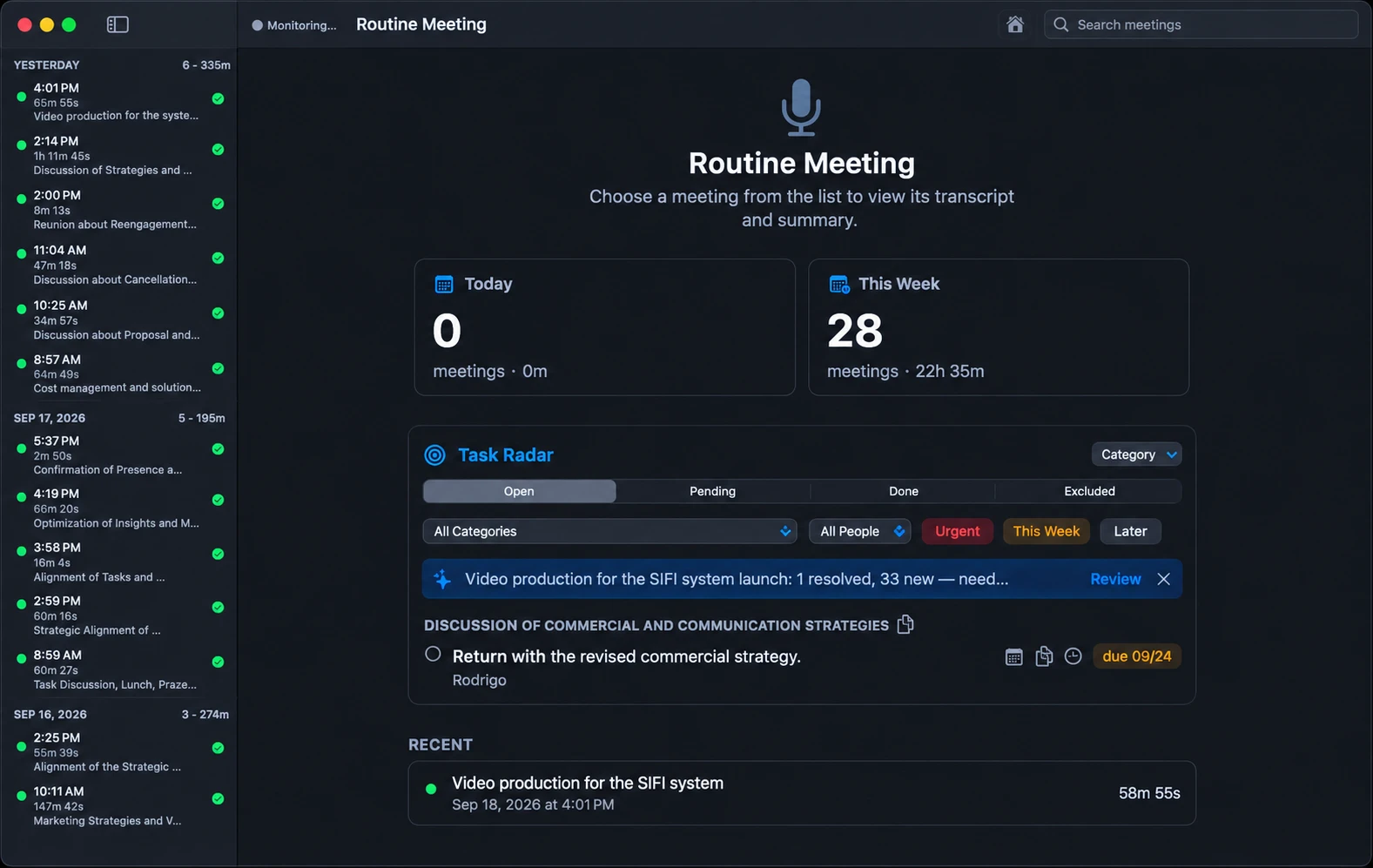
Limits: closed source, speaker labels are you versus everyone else (not one name per person), no team sharing, no integrations, no SOC 2 report, and no phone or web app.
MacWhisper (Pro: 64 EUR, one time)
A mature transcriber for files and dictation that also records meetings in Zoom, Teams, Webex and more, with automatic start and end detection, no bots, and local models. Its docs describe meeting recording as a beta and say all participants are grouped as one speaker for now.
Biscotti (free, source-available)
Fully local pipeline: Whisper V3 Turbo, per-person speaker separation and a Gemma model for summaries. Needs macOS 15 or later and recommends 16 GB of RAM.
MacParakeet (free, GPL-3.0)
Open source, no account. Local speech recognition, separates you from everyone else, writes audio to disk every second so a crash does not lose a meeting. Summaries go to the AI provider you configure. Needs macOS 14.2 or later and Apple Silicon.
echo99 (free)
Per its own site: records your mic and your Mac’s audio locally with no bot, transcribes on-device in 25 languages (same with Wi-Fi off), recognizes recurring voices and labels them by name using local voice matching, and generates on-device summaries with key points, decisions and action items. Free, no account, no minute limits. Needs macOS 14.4 or later and runs on Apple silicon and Intel. Its live transcription is marked experimental, and it sends an anonymous install ID at launch for update checks. Treat these as the vendor’s claims.
Muesli
Per its own site: a free, open-source macOS app for Apple Silicon Macs that captures meeting audio from your computer without a bot and transcribes on-device with Parakeet or Whisper models, and adds hotkey dictation. Its page did not say whether summaries run locally or in the cloud, or whether it labels speakers, so I leave those blank.
Hapi (macOS 14+, from 79 EUR once for meetings)
Per its site, Hapi is a Mac app that transcribes locally and auto-detects Zoom, Meet, Teams, Slack, WhatsApp and a few more apps from a list. The Local plan adds meeting features, speaker labels and on-device AI summaries. Routine Meeting detects a call by its audio pattern instead of a list of apps, and it is free.
Shadow
Per its site, Shadow is a Mac-only app that detects meetings, joins no calls, and says transcription happens on your Mac with audio staying on the device. It offers a free trial. I could not confirm its price from the page I read.
Whisper Notes ($14 once on Mac)
Per its comparison page, Whisper Notes transcribes fully on the device with Whisper Large V3 Turbo and Parakeet V3, supports offline meeting recording on the direct-download Mac version, labels speakers on the device after the recording ends, and has no monthly minute cap. It needs Apple Silicon.
Fathom (free, hosted)
Not a local option. Per its pricing page, Fathom’s free plan includes unlimited recordings, transcripts and AI summaries, and recording is bot-free in beta or bot-based. It does not say where data is processed. Choose it if the limit that bothers you is Otter’s minute cap and you accept a hosted service.
Side by side
| Otter | Routine Meeting | MacWhisper | Biscotti | MacParakeet | echo99 | |
|---|---|---|---|---|---|---|
| Bot-free on Mac | Yes, desktop app | Yes | Yes | Yes | Yes | Yes |
| Transcription | Hosted service | On your Mac | On your Mac | On your Mac | On your Mac | On your Mac |
| Account needed | Yes | No | No | No | No | No |
| Price | Free tier; Pro from $8.33 annual | Free | Free tier; Pro 64 EUR once | Free | Free | Free |
| Minute caps | 300 free, 1,200 Pro | None | None | None | None | None |
| Speaker labels | Speaker identification (paid plans) | You vs others | One speaker (beta docs) | Per person | You vs others | Local recognition |
| Team sharing and integrations | Yes | No | Export and automations | No | No | No |
| Compliance report | SOC 2 Type 2, HIPAA | None | None | None | None | None |
| Platforms | Web, Mac, Windows, iOS, Android, Chrome | Mac | Mac | Mac | Mac | Mac |
| Mac requirements | macOS 12.3+ (desktop app) | Apple Silicon, macOS 13+ | Not checked | macOS 15+, Apple Silicon | macOS 14.2+, Apple Silicon | macOS 14.4+, Apple silicon or Intel |
Which should you choose?
- You work in a team, share notes, and need integrations or a compliance report: stay with Otter, or choose a hosted tool. A local app will not give you shared workspaces.
- You are on a Mac and want audio kept on your machine, with no account and no minute meter: pick a local app. Routine Meeting if you want it to start with every call, in any app. Biscotti if you want per-person speaker labels and a fully local summary. MacParakeet if you want open source.
- You also transcribe lots of files and dictate: MacWhisper.
- You want to pay once, not monthly: MacWhisper, Whisper Notes or Hapi, all one-time purchases.
- You want free and accept a hosted service: Fathom’s free plan has no minute cap.
- You mostly need it for interviews or voice notes: a file-based transcriber is cheaper than a meeting subscription; the Reddit threads on this topic point to Whisper-based tools.
Moving from Otter to a local app
- Export what you need. Download your important transcripts from Otter before cancelling; nothing local will import them.
- Install and grant permissions. Microphone, and Screen and System Audio Recording. The second name sounds scary, but only audio is captured.
- Run it side by side for a week. Keep Otter for team meetings while you test the local app on your own calls.
- Decide about summaries. Local summaries are private but weaker than a large cloud model. Routine Meeting lets you choose per need.
- Check recording consent. Local does not change the law; many places require telling participants you are recording.
FAQ
Is there a free alternative to Otter? Yes. Fathom has a free hosted plan with unlimited recordings and summaries. On your Mac, Routine Meeting and several other apps are free with no minute meter.
What are the limits of Otter’s free plan? 300 minutes a month, 30 minutes per conversation, and 3 lifetime file imports, per Otter’s pricing page.
Is there an Otter app for Mac? Yes. Otter has a desktop app for Mac and Windows that records without a bot, and a web app.
Does Otter put a bot in my call? Otter’s Notetaker can join a meeting as a participant, and the desktop app lets you record without it.
Is Otter free on Mac? There is a free plan with 300 minutes a month and 30 minutes per conversation.
What is a good Otter alternative that works offline? Apps that transcribe on your device, such as Routine Meeting, Biscotti, MacParakeet and echo99, can transcribe without a connection once their models are downloaded.
Will a local app match Otter’s accuracy and summaries? Whisper-family models are strong on clear speech. Local summaries are weaker than cloud ones, and none of the local apps offer shared workspaces or an AI chat across your whole team’s meetings.
Sources (checked 2026-10-06, cost table and added options 2026-10-07)
- Otter: pricing page, privacy and security page, desktop app page, help article “Otter Desktop App (Mac and Windows)”, and the launch post “Introducing the Otter Desktop App” (Oct 7, 2025), all on otter.ai
- echo99: echo99.app and echo99.app/otter-alternative
- Muesli: muesli.works and muesli.works/otter-ai-alternative
- MacWhisper: macwhisper.com and docs.macwhisper.com
- MacParakeet: macparakeet.com/meetings
- Biscotti: github.com/scosman/Biscotti
- Fathom: fathom.ai/pricing
- Whisper Notes: whispernotes.app/whisper-notes-vs-otter-ai
- Hapi: speakhapi.com
- Shadow: shadow.do